Rule candidate for review
Test the proposed rule against representative and fault cases before approval.
A program from a demonstration
It runs on this computer. You can show the clicks, or a local agent can click while you watch. OpenAdapt turns the recording into a program. A person admits it. Later it repeats the work here. Those runs don't send your data to a model. Before it says the job is done, it checks the record, not the screen.
Desktop or the command line. Same program.
pip install openadapt
openadapt flow tutorial
Don't use this when a supported API covers the job. Use the API. Don't use it for a novel task that should be re-planned each run; that's a computer-use agent. A halt looks like this: two look-alike records share a name, OCR can't tell their numbers apart, and the program stops before it writes. See the wrong-patient defense
How it works
You can show the clicks, or a local agent can click while you watch. A person still has to admit the program. After that, the agent calls it and healthy runs make no model calls.
Record one bounded workflow in its real application. You can show it, or a local agent can click while you watch. A person still has to admit the program.
The recording becomes a program the agent can invoke. Review the steps, identities, expected results, and environment before you reuse a version.
Before it says it worked, a separate read proves whether the change landed. That check may use an API, a database, a file, or a second session.
The run reports VERIFIED only when that check passes. If it can't prove the effect, it stops.
From demonstration to program
See what a demonstration compiled into. A recording under-specifies intent. The compiler turns it into a program you can read before it runs: each step, the resolution ladder, where an identity gate is armed, which writes carry an effect check, and every point the run can halt.
Select a step to see its resolution evidence, identity gate, action contract, and result check. Then switch to the halt scenario. The same program stops before an unsafe action and keeps the exact comparison for review.
8d9c…42afpublic syntheticevent 01Process Contract v1
An OpenAdapt App is a sealed Process Contract. One governed process can include GUI work, exact code, and attended checkpoints. Each child keeps its own authority and evidence.
Run an exact bundle with a live qualification admission. The child must return VERIFIED before the process can finish.
Run the admitted source archive and runtime. A separate verifier confirms each declared output digest before a downstream child can read it.
Pause for a closed review, decision, or action. Resume only from a signed receipt bound to this process and run. A downstream check still proves the effect of an action.
openadapt-flow visualize my-bundle --format html -o graph.htmlopenadapt-flow for-each my-bundle --records worklist.csv --out queue-bundleQualification · Human judgment
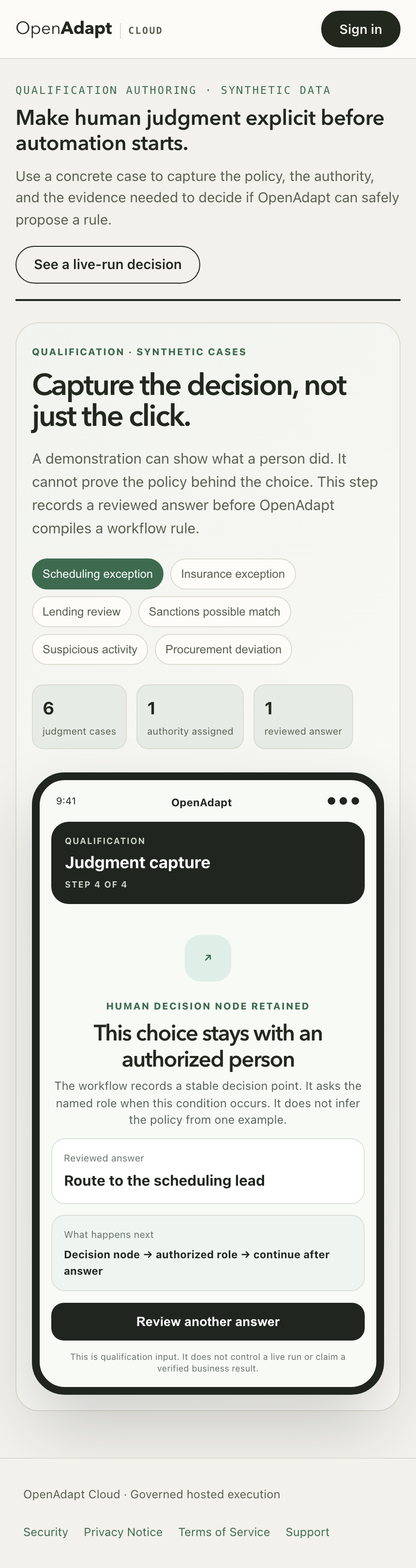
During qualification, your team can show how an institutional exception should be handled. OpenAdapt records the reviewed choice and the authority behind it. One answer never becomes policy by itself.
Test the proposed rule against representative and fault cases before approval.
Keep the choice with an authorized role whenever policy or discretion requires it.
Collect contrasting cases when the available evidence does not justify a stable rule.
UI drift
OpenAdapt is not an unconstrained agent. Drift ends in one of four explicit outcomes, each visible in the run report.
Automatic
Structure, templates, OCR, and geometry try to re-find the recorded target. No model is required. A changed anchor is saved as an auditable bundle diff.
Optional
If deterministic evidence is insufficient and a model is configured, it can propose a target or confirm limited visual state. The model can be wrong, so identity, policy, and postcondition gates still decide whether execution continues.
Operator path
A halt produces evidence for an operator. The CLI can teach a correction, and durable mode can checkpoint verified progress for authenticated approval and resume.
Unsupported drift
If no configured path can establish the target or expected result, the workflow stops. OpenAdapt does not claim general adaptation to arbitrary application changes.
Availability and refusal depend on retained evidence and configuration. Identity checks cover armed steps only; system-of-record verification requires declared effects and a configured verifier. Read the measured limits.
Where it runs
OpenAdapt keeps the workflow and its safety checks separate from the controls used in each application, so one surface can use structural evidence and another can use pixels without changing the workflow contract.
Uses DOM, accessibility, visual, and interaction evidence to run browser workflows.
Supports the complete record, compile, replay, and verify loop.
Operates Windows, macOS, and Linux applications through native accessibility plus retained visual evidence.
Uses the same workflow contract through customer-controlled qualification.
Operates RDP, Citrix Workspace, and VDI through pixels, keyboard, and mouse, with the same identity and result checks. The result check reads whatever channel the target system exposes, so a pixel-only surface still verifies out of band.
Uses the same workflow contract through customer-controlled qualification.
Each surface carries its own measured acceptance evidence in the qualification evidence
Choose the execution boundary
Use the OpenAdapt control plane and managed runners for approved browser and non-sensitive workloads.
Need a hosted runner? Talk to us.Run sensitive data, native applications, RDP, Citrix, private networks, and restricted-egress workflows inside your boundary. External black-box remote execution does not require software inside the managed session.
Review the security boundaryRemote execution modes
Where policy permits software inside the managed session, the runner executes in-session. Where it does not, the external lane drives the local remote-desktop client window from outside, so nothing is installed in the remote environment. Both modes keep the same identity, policy, verification, and halt contracts.
The runner is installed inside the managed session, when your policy permits it.
Managed session (Citrix / RDP / VDI)
OpenAdapt runner
Runs beside the application with native accessibility and visual evidence.
Target application
The system-of-record UI inside the session.
Requires software inside the session image, so it fits estates where you control the image or policy allows an installed agent.
The runner drives the local Citrix or RDP client window. Zero install inside the remote session.
Your workstation
OpenAdapt runner (outside the session)
Operates through pixels, keyboard, and mouse with a two-phase lease: re-resolve on a fresh frame, refuse if anything changed before delivery.
Local Citrix / RDP client window
The vendor client you already run.
Managed session (remote)
Untouched: no agent, driver, or install inside the session.
Fits locked-down estates where nothing may be installed in the managed environment.
Real application footage
Choose an application, compare the recorded demonstration with its compiled replay, and open the evidence behind the result.
Guided view synchronized to the exact retained runtime timeline; raw footage remains unchanged.